Photography Booking & Client Management Made Easy
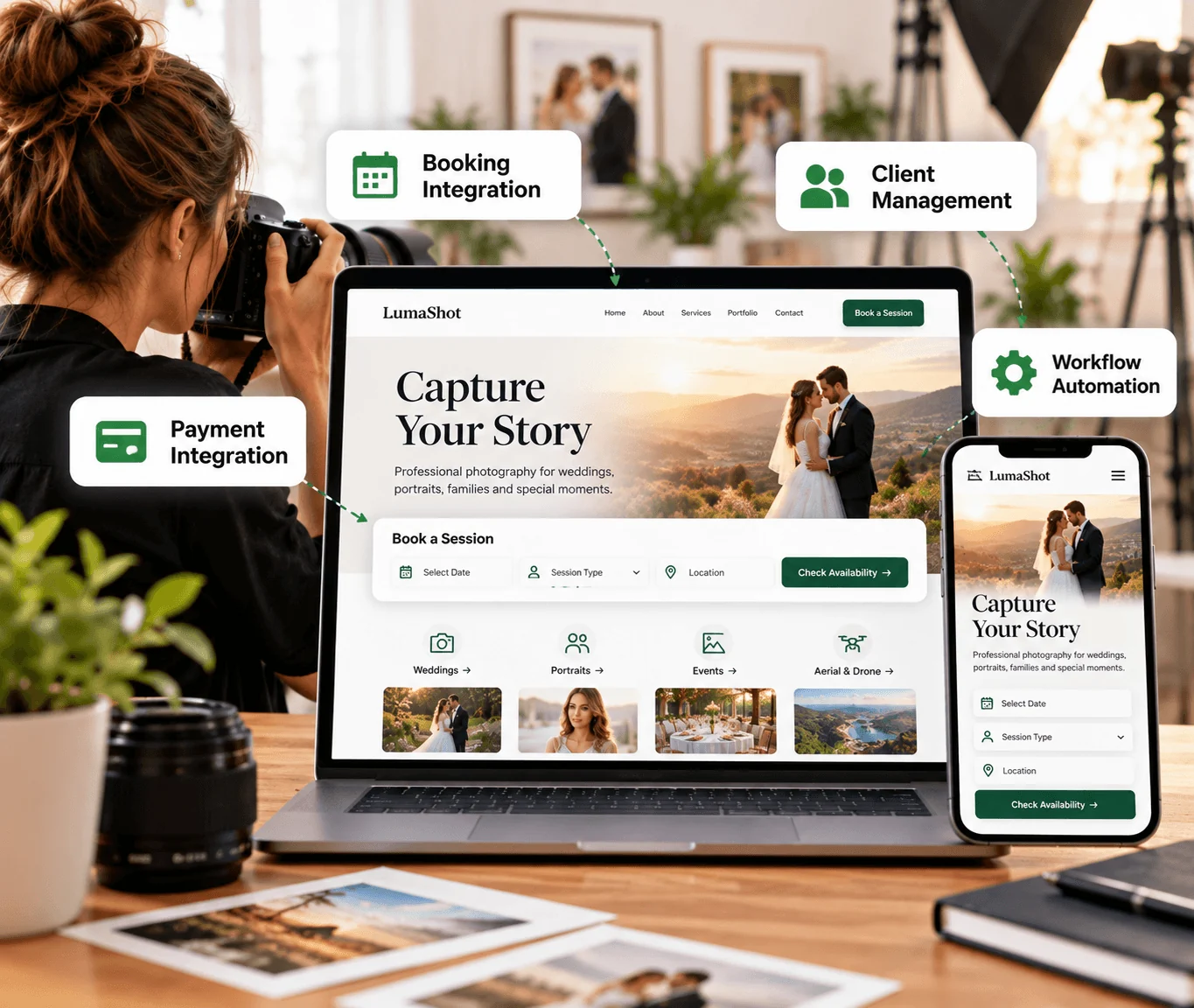
Already have a photography website but still manage bookings manually? Qrolic connects your site with booking forms, supported third-party tools, and client management systems to simplify workflows.
Trusted by large companies worldwide.
















Existing Website Integration
Make Your Existing Photography Website Work Better for Your Business
Your website may showcase your portfolio, but manual availability checks and separate payment steps take time. Qrolic connects booking and client tools to your existing site without a full redesign.
Connect
Organize
Simplify
Our Capabilities
- Booking Form Integration
- Third-Party Tool Integration
- Client Management Connection
- Payment Gateway Integration
- Workflow Automation Support
- Website Integration Customization

Booking Integration Services
What Is Photography Booking System Integration?
Photography booking system integration connects your existing website with supported booking, scheduling, payment, and client management tools, depending on your platform and requirements.
01
What Is a Photography Booking Site?
A photography booking site lets potential clients submit booking requests or interact with your booking process through a website. It can connect visitors with booking forms and business tools to move from inquiry toward a confirmed session.
02
Why Integrate a Booking System Into Your Existing Website?
Managing inquiries through separate emails, spreadsheets, and manual communication can create unnecessary administrative work. Connecting your website with supported booking and client management tools helps organize the process.
03
How Does a Photographer Online Booking System Work?
A photographer online booking system can let visitors submit session requirements through a website form. Depending on the connected tools, that information can then pass to other systems your photography business uses.
04
Can You Integrate Booking Tools Without Rebuilding Your Website?
Yes, integration requirements can be assessed for an existing website. Options depend on its platform, current structure, and compatibility with the tools you want to connect, so a complete redesign is not automatically required.
What Is Photography Scheduling Software Integration?
Photography scheduling software integration connects an existing website with supported scheduling or booking tools. It can help reduce disconnected processes between website inquiries and the systems used to manage appointments.
Benefits
Benefits of Integrating Booking and Client Management Tools
Integration can help your website, booking forms, and business tools work together, so information is easier to manage for you and your clients.

Reduce Manual Booking Work
Connecting website forms with supported tools can reduce the need to manually transfer information between disconnected systems.

Improve the Client Inquiry Process
Give potential clients a more structured way to submit booking requests and session information through your existing website.

Connect Your Existing Business Tools
Bring supported forms, CRM, email, and other business tools into a more connected workflow instead of managing every activity separately.

Support Payment Collection
Where supported by the selected payment gateway and booking workflow, integration can help connect payment functionality with your website.

Keep Your Existing Website
Integration can focus on your current website instead of a complete rebuild, which is useful when your portfolio and design already meet your needs.

Build a More Organized Workflow
A connected setup can make it easier to manage information across your website and business tools, helping reduce repetitive administrative tasks.
Still Managing Photography Bookings Manually?
Free Recruitment Site Review
Your existing website can do more than display your portfolio. Connect it with the tools your business needs and create a more organized booking process.

Our Workflow
Our Photography Booking Integration Process
Our process helps us understand your requirements, connect the necessary tools, and prepare the integration for use.
01
Understand Your Requirements
02
Design and Build the Integration
03
Connect Your Tools
04
Customize and Automate
05
Review and Test
06
Training and Guidance
07
Ownership and Handover
Step 01
Understand Your Requirements
We begin by understanding your existing website, current booking process, and client management requirements, and identify the tools you already use and the functionality you want to connect.
Step 02
Design and Build the Integration
Based on your requirements, we plan the integration approach and develop the necessary website functionality, guided by your website structure and the capabilities of the selected tools.
Step 03
Connect Your Tools
We connect the website with the supported third-party services your workflow needs, which may include booking forms, CRM tools, email services, or other supported integrations.
Step 04
Customize and Automate
We configure the integration around your business requirements and explore supported automation opportunities to reduce disconnected steps and make routine processes easier to manage.
Step 05
Review and Test
We review the implemented functionality and test the integration to identify issues before handover. This helps confirm the connected components work as intended within the agreed scope.
Step 06
Training and Guidance
We provide guidance on using the implemented functionality so you can understand how the connected website features and tools fit into your workflow.
Step 07
Ownership and Handover
The completed integration is handed over with ownership of your website and relevant accounts retained by you, so you remain in control of your website and connected services.
Comparison
Manual Booking Management vs. Connected Website Integrations
The right integration depends on how your photography business currently operates. Qrolic reviews your requirements before recommending an implementation approach.
Generic Drone Websites
Without Qrolic :
- Bookings arrive in many channels
- Client data copied by hand
- Forms separate from client tools
- Payments handled separately
- Repetitive admin tasks
- Site lacks booking workflow
With Qrolic’s Design & Development
With Qrolic :
- Booking forms linked to your tools
- Inquiries flow to supported systems
- Forms linked to CRM and services
- Payment gateway integration
- Supported workflow automation
- Existing site extended, not rebuilt
Case studies
Explore Qrolic’s Website and Integration Work
Qrolic works on website and integration projects across different requirements. This page does not present a photography-specific booking integration case study or claim results.

Building the First TailoredPay Payment Gateway Plugin for WordPress & Gravity Forms
Overview TailoredPay had no existing WordPress integration available — not…

Uketa Support – Multi-Language Immigration Platform with Secure Cross-Site Payments
Overview Uketa Support is a multi-language immigration assistance platform built…

My Passport Center – Immigration Platform with Secure Payment Infrastructure
Overview My Passport Center is a high-volume immigration services platform…

Martens – Employment Hero API Integration for WordPress
Overview Martens required a custom careers platform capable of pulling…

First Pass Airport Services – Google Maps Distance Pricing Integration
Overview First Pass Airport Services operates a luxury chauffeur service…

Drip Hydration UK Case Study – HIPAA-Aligned LatePoint Data Encryption
Overview Drip Hydration UK operates a healthcare-focused appointment booking platform…

Custom Brevo API Integration for WordPress — Transactional Emails & Workflow Automation
Overview The client’s immigration platforms relied on WordPress wp_mail for…

Automated WordPress File Migration to S3-Compatible Cloud Storage
Overview The client’s immigration platform was generating hundreds of PDFs…

Azure OCR Integration for WordPress – Custom Document Scanning & Auto-Fill Plugin
Overview The client’s immigration platforms required users to manually enter…

Building a Frontend Application Management Dashboard for WordPress
Overview Managing hundreds of applications directly from the WordPress admin…
Why Choose Qrolic
Integration Solutions Built Around Your Existing Website
Qrolic works with your existing website and tools, plans scope before development, and hands over ownership and guidance so you stay in control of your connected setup.
0+
Years of WordPress
Delivering top-tier digital services across design, development, and performance.
0+
Happy Clients
Serving global brands with a 95%+ satisfaction rate across industries.

0%
Client satisfaction
We’re committed to delivering solutions that truly make an impact.
0+
Team members
A strong team of experts in WordPress, web technologies, and UI/UX.
Discuss Your Integration
Let’s Connect Your Photography Website With the Right Tools
Tell us about your current setup and the tools you want to connect. Qrolic can review your requirements and discuss an integration approach for your website and workflow.
Curious About the Cost? Free
Just drop your requirements on WhatsApp, and we’ll send you an instant estimate—no forms, no waiting.
 Message on WhatsApp

Curious About the Cost? Free
Just drop your requirements on WhatsApp, and we’ll send you an instant estimate—no forms, no waiting.
Frequently Asked Questions
Frequently Asked Questions About Photography Booking System Integration
Learn how booking and client management tools can connect with an existing photography website, and what affects the scope of an integration project.
Can Qrolic Integrate a Booking System Into My Existing Photography Website?
Yes. Qrolic can assess your existing website and discuss integrating booking forms and supported third-party tools. The available implementation depends on your website platform, technical structure, and the services you want to connect.
What Is a Photographer Online Booking System?
A photographer online booking system allows potential clients to submit booking requests through a website. Depending on the system, it may connect with other business tools used to manage inquiries and sessions.
Can I Connect My Existing CRM With My Photography Website?
Yes, provided the CRM supports a suitable integration method. Qrolic works with supported third-party integrations, including CRM, forms, email, newsletter, and analytics tools. The specific CRM and requirements should be reviewed before implementation.
Does Photography Scheduling Software Integration Require a New Website?
Not necessarily. If your existing website supports the required functionality and integration methods, booking or scheduling tools may be connected without rebuilding the entire website.
Can I Integrate Payment Gateways With My Photography Booking Website?
Payment gateway integration can be considered as part of the project. The available options depend on the selected payment provider, website platform, and booking workflow. We assess these requirements before confirming the implementation scope.
Can a Photography Booking System Connect With Client Management Tools?
Yes. Supported third-party connections can help transfer website inquiry information into relevant client management systems. The exact workflow depends on the tools involved and their integration capabilities.
What Is Photography Scheduling Software Integration Useful For?
It helps connect a website with supported booking or scheduling tools. It can make inquiry and appointment management more organized and reduce the need to handle information across disconnected systems.
Can Qrolic Customize a Session Booking Platform for Photographers?
Qrolic can customize website functionality and connect supported tools according to your requirements. The scope depends on whether the requested functionality can be achieved through available integrations or requires additional custom development.
Does Qrolic Provide a Ready-Made Photography Booking Software Product?
This service focuses on website integration and connecting supported third-party tools. It is not positioned as a standalone photography booking software product.
How Do I Get Started With Photography Booking System Integration?
Share your existing website URL, the booking or client management tools you use, and the functionality you want to connect. Qrolic can review your requirements and discuss a suitable integration approach.